Functional Description
The SIO06 - called “Device” throughout this document - is a unit to wake up a vehicle through network commands.
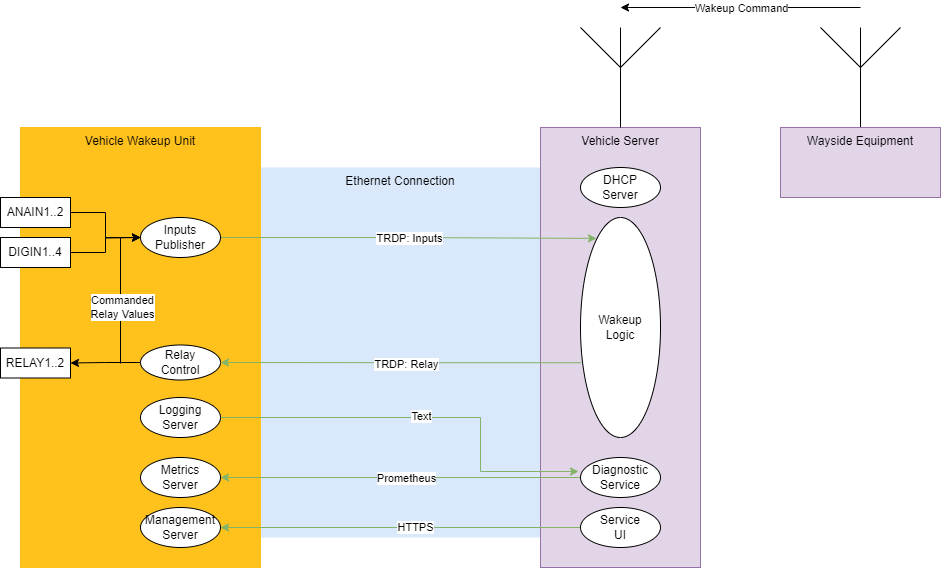
In a typical setup, the device and another low-power computer (called “vehicle server”) are always powered by the vehicle battery even if the rest of the vehicle is powered down. The vehicle server and the device are connected via Ethernet.
To turn on the vehicle power, the device provides two independent relay outputs that the vehicle server can activate through the network. Typically the vehicle server provides a radio connection to wayside equipment, so that the vehicle wake-up can be issued remotely.
In addition, the device features two analog inputs and four digital inputs that may be connected to sensors and discrete signals. The vehicle server can consume the values of those inputs to conditionally wake up the vehicle. A typical use case is to connect a temperature sensor to an analog input, so that the vehicle server can wake up the train when the temperature is above or below a certain threshold.
System Context
The drawing below shows a possible system architecture, where the Device is connected to a Vehicle Server via Ethernet.
Process Data Interfaces
Process data is exchanged via the TRDP protocol. The Device implements a TRDP sink to receive relay commands from the vehicle server, and a TRDP source to publish the status of the analog and digital inputs at a configurable update cycle.
Both sink and source ports follow the TRDP Process Data Push Pattern, according to IEC61375-2-3:2015.
Sink/Subscriber (relay control)
The device listens for relay commands on the TRDP sink port. When a valid command is received, the device sets the relay outputs according to the values in desired_relay_state.
When the command bit for a relay is 1, the relay is turned on: Its common contact is connected to the normally open (NO) contact. When the command bit is 0, the relay is turned off: Its common contact is connected to the normally closed (NC) contact.
Note
There is no automatic fallback to the off state, the vehicle server must explicitly turn off the relays.
Sink Specification
- Pattern: PD Push Pattern
- UDP port: 20548
- ComID: configurable, see Device Parameters,
rel-comid - Payload:
| Byte Offset | # of Bytes | Variable | Details |
|---|---|---|---|
| 0x0 | 1 | desired_relay_state |
Bit0: Relay1 Bit1: Relay2 Bit==0: turn relay off Bit==1: turn relay on |
| 0x1 | 3 | padding |
Publisher/Source (input publishing)
The device publishes the status of the analog and digital inputs at a configurable update cycle. The IP address must be configured in the device parameter input-pubhost. This may be a unicast or multicast address.
The vehicle server can subscribe to this data to monitor the inputs.
Analog inputs are internally sampled at a rate of ~61 Hz. The publisher uses the latest sampled value when publishing.
Analog inputs are represented in ana1 and ana2 as IEEE 754 floating-point values. The range is approximately -1.2 to +1.2 (the saturation value), where 1.0 represents +10 V at the voltage input (Vin) or +20 mA at the current input (Iin).
Note
The exact max/min value during saturation depends on the specimen, because each specimen is individually adjusted.
The digin variable contains the status of the four digital inputs. Each bit represents one input, where 0 means low and 1 means high.
The relay variable contains the readback of the desired relay state. This is the last command received via TRDP sink. There is no detection of relay faults, so the actual relay state may differ from the desired state.
Source Specification
- Pattern: PD Push Pattern
- UDP port: 20548
- ComID: configurable, see Device Parameters,
input-comid - Rate: configurable, see Device Parameters,
input-pubper - Payload:
| Byte Offset | # of Bytes | Variable | Details |
|---|---|---|---|
| 0x0 | 4 | ana1 |
big endian, IEEE 754 |
| 0x4 | 4 | ana2 |
big endian, IEEE 754 |
| 0x8 | 1 | digin |
Bit0: IN1 Bit1: IN2 Bit2: IN3 Bit3: IN4 Bit==0: Input low Bit==1: Input high |
| 0x9 | 1 | relay |
Readback of desired relay state Bit0: Relay1 Bit1: Relay2 Bit==0: relay off Bit==1: relay on |
| 0xa | 2 | padding |
Device Management
The device provides an HTTPS REST interface for device management and configuration. See REST API for details.
The major features are:
- Firmware update
- Firmware version information
- Hardware inventory information
- Configuration of device parameters
- Restart device
- Factory reset
The REST API is protected by HTTP basic authentication. The default password should be changed by the user.
The HTTPS server comes with a self-signed certificate. For production use, it is recommended to replace it with a certificate signed by a trusted CA. This can be done via the REST API.
You can directly use the REST API from your application or use the io4edge-cli command-line tool, which provides a convenient wrapper around the REST API. Releases are available at the io4edge-client-go GitHub repository.
Firmware Repository
You can find the latest firmware images at the SIO06 Public Firmware Repository.
Device Parameters
Device parameters are persistently stored in non-volatile memory. They are retained when the device is powered off or restarted. Parameters can be configured via the REST API.
The device has two classes of parameters: Global device parameters and VWU specific parameters.
Global Device Parameters
Global device parameters are common to all Ci4Rail MEP devices.
They can be set over network using the PUT /parameter/{parameter-name} REST API, or through the Console, via param set <parameter-name> <value> command.
| Parameter | Description | Default | Example |
|---|---|---|---|
| device-id | to identify the device in the network (e.g. via mdns) | (None) | SIO06-1 |
| static-ip | static IP address, network mask and gateway. If not set, DHCP is used. | (None) | 192.168.11.11:255.255.255.0:192.168.11.1 |
VWU Specific Parameters
VWU specific parameters are specific to the Vehicle Wakeup Unit application. They can be set as a ParameterSet or as single parameters.
Using ParameterSets has the advantage that all parameters are set atomically and you can upload a version number for that set. This allows to keep track of configuration changes. The default version is "factory".
When manipulating single parameters, the version number is appended with a "(modified)" suffix.
Use the PUT /vwu/parameterset REST API to set a ParameterSet, or the PUT /vwu/parameter/{parameter-name} REST API to set single parameters.
Via the console, only single parameters can be set, using the param vwu.<parameter-name> <value> command.
| Parameter | Description | Default | Example |
|---|---|---|---|
| rel-comid | ComID of TRDP relay sink, in hex notation | 56575530 | A2F66F23 |
| input-comid | ComID of TRDP input source, in hex notation | 56575531 | A2F66F24 |
| input-pubhost | IP address or DNS name of TRDP input source destination | (None) | 192.168.1.100 |
| input-pubper | Update period of TRDP input source, in Hz, between 0.1 and 5 Hz | 1.0 | 3.5 |
Diagnostics
The device has LEDs and exposes metrics and log data for diagnostics and monitoring.
STATUS LED
The STATUS LED indicates the current status of the device:
- OFF: Device is powered off or has not yet finished booting
- RED: Device startup failed or device is not completely configured
- GREEN: Device startup successful and device is fully configured
Note
As long as the input-pubhost parameter is not configured, the STATUS LED will stay in RED state because it is not fully configured.
LINK LED
The LINK LED indicates the status of the Ethernet link:
- OFF - no link
- GREEN - link, no activity
- FLASHING - link and activity
Relay LEDs
Each relay has a dedicated LED that indicates the desired state of the relay:
- OFF: Relay is off (C connected to NC)
- GREEN: Relay is on (C connected to NO)
Binary Inputs LEDs
Each digital input has a dedicated LED that indicates the status of the input:
- OFF: Input is low
- GREEN: Input is high
Device Metrics
The device provides metrics via the Prometheus API, delivering Prometheus text-based metrics. They can be directly consumed by a Prometheus server.
The metrics are available at http://<device-ip>:9100/metrics.
List of available metrics:
| Metric Name | Label | Type | Description |
|---|---|---|---|
| reset_count | reason | Counter | Number of device resets, labeled by reset reason (poweron, software, panic, ...) |
| free_heap | Gauge | Free heap memory in bytes | |
| up_seconds | Gauge | Uptime in seconds | |
| number_packets_received | type | Counter | Number of TRDP packets received, labeled by type (good, lost, bad_crc, ...) |
| number_packets_published | type | Counter | Number of TRDP packets sent, labeled by type (good, failed) |
| ana | channel | Gauge | Latest value of analog input channel (-1.2 to +1.2), labeled by channel (ch1, ch2) |
| bin | Gauge | Latest value of digital inputs, as a bit mask | |
| relay | Gauge | Latest desired relay state, as a bit mask | |
| adc_errors | type | Counter | Number of ADC errors, labeled by type (spi, tout) |
Log Data
Log data is available via TCP port 9998. The log data is in plain text format and can be viewed using netcat, e.g. nc <device-ip> 9998.
Example log data:
I (962) io4edge_rest_api: Starting server
I (962) esp_https_server: Starting server
I (8787) input_collector: digin 0x01
I (8787) input_collector: meas ch0 0.905846 9.058461V
I (8788) input_collector: meas ch1 0.895199 8.951991V
Each line begins with a log level indicator: I for info, W for warning, E for error. Then follows a timestamp in milliseconds since boot, the module name, and the log message.
Note
The log data is not persistent, so it is lost when the device is powered off or restarted. It is recommended to use a log collector to store the log data persistently. Furthermore, the device can only buffer a few lines of log data, older log data is lost when the buffer is full.
Device Events Mapping to Metrics and Logs
The following sections describe how the device behaves in certain events and which metrics and logs are generated. In addition, a recommendation is given on whether an alert should be generated by a monitoring system so that a human operator can investigate and fix the issue.
Good TRDP Telegram received
Behaviour: Packet is accepted
Metrics: number_packets_received{type="good"} incremented
Log: none
Alert recommended: no
TRDP telegram with header CRC error received
Behaviour: Packet is ignored
Metrics: number_packets_received{type="bad_crc"} incremented
Log: E trdp: trdp header crc check failed
Alert recommended: no
TRDP telegram that is too short received
Behaviour: Packet is ignored
Metrics: number_packets_received{type="short"} incremented
Log:
E trdp: trdp packet size mismatch. pdu is <size>, trdp info <size>E trdp packet payload does not fit in user bufferE: vwu_trdp_sink_actor: received trdp packet with wrong size
Alert recommended: no
TRDP telegram with wrong message type received
Behaviour: Packet is ignored
Metrics: number_packets_received{type="bad_type"} incremented
Log: W trdp: trdp message type mismatch. Got <type>
Alert recommended: no
TRDP telegram with bad header version received
Behaviour: Packet is ignored
Metrics: number_packets_received{type="bad_version"} incremented
Log: W trdp: trdp protocol version mismatch. Got <version>
Alert recommended: no
TRDP telegram with wrong COMID received
Behaviour: Packet is ignored
Metrics: number_packets_received{type="bad_comid"} incremented
Log: W trdp: trdp com id does not match. Got <id>
Alert recommended: no
TRDP telegram with incorrect len received
Behaviour: Packet is ignored
Metrics: number_packets_received{type="bad_len"} incremented
Log: E trdp: pdu_size too large: <size>
Alert recommended: no
TRDP Old Sequence Number received
If the received sequence number is behind the expected sequence number (and the difference is not more than 10), the packet is considered old and ignored. This may happen if packets are delayed in the network and arrive out of order.
Behaviour: Packet is ignored
Metrics: number_packets_received{type="seq_old"} incremented
Log: W: received sequence counter <seq> is <diff> packets behind expected. probably delayed packet
Alert recommended: no
TRDP Sequence ahead (lost packets)
If the received sequence number is ahead of the expected sequence number (and the difference is not more than 10), the packet is accepted, but the expected sequence number is resynced to the received sequence number. The difference between received and expected sequence number is considered as lost packets.
Behaviour: Packet accepted, expected sequence number resynced
Metrics: number_packets_received{type="lost"} incremented by difference
Log: W: received sequence counter <seq> is <diff> packets ahead of expected. (packets lost)
Alert recommended: no
TRDP Sequence Number too far away (resync)
If the difference between received and expected sequence number is more than 10 (either ahead or behind), the packet is ignored, but the expected sequence number is resynced to the received sequence number. This may happen if either the vehicle server or the device was restarted. In that case, the sequence numbers are out of sync and the expected sequence number must be resynced.
Behaviour: Packet ignored, expected sequence number resynced
Metrics: number_packets_received{type="seq_resync"} incremented
Log: W: received sequence counter <seq> is too far from expected <seq>. Resetting expected counter
Alert recommended: no
TRDP receive timeout
There is no TRDP receive timeout implemented.
TRDP telegram sent successfully
Behaviour: -
Metrics: number_packets_published{type="good"} incremented
Log: none
Alert recommended: no
TRDP telegram send failure
Behaviour: Packet is dropped
Metrics: number_packets_published{type="failed"} incremented
Log:
W trdp: dest IP could not be resolvedE trdp: failed to send trdp packet with seq: <seq> errno <errno>
Alert recommended: no
TRDP output buffer overflow
When parameter vwu.input-pubhost is not configured, this message is expected. Likewise, when no network is connected, the warning is normal (it is then only visible on the console).
Behaviour: -
Metrics: -
Log: W vwu_trdp_source_actor: trdp source queue is full
Alert recommended: yes
ADC value acquired
Behaviour: New ADC value is sampled
Metrics: ana{channel="ch1"} and ana{channel="ch2"} updated
Log: I input_collector: meas <ch> <value>
Alert recommended: no
ADC value out of range (<1.2 or >1.2)
Behaviour: analog value reported as approximately -1.2 or +1.2 (saturation)
Metrics: -
Log: -
Alert recommended: yes, may be broken cable or broken PCB trace
ADC SPI communication error
Behaviour: analog value reported as NaN (Not a Number)
Metrics: adc_errors{type="spi"} incremented
Log: E anaX: CRC mismatch: … and E input_collector: spi error on channel <ch>
Alert recommended: yes, internal HW error
ADC timeout error
Behaviour: analog value reported as NaN (Not a Number)
Metrics: adc_errors{type="tout"} incremented
Log: E input_collector: ADC channel <ch> measurement not ready
Alert recommended: yes, internal HW error
Binary input status acquired
Behaviour: New binary input status is sampled
Metrics: bin updated
Log: I input_collector: digin <hexvalue>
Alert recommended: no
Relay coil status modified
Behaviour: Relay coil is energized or de-energized
Metrics: relay updated
Log: I vwu_relay_control_actor: set relay 1 = <state> | set relay 2 = <state>
Alert recommended: no
Out of memory (heap)
Behaviour: Operation that required memory allocation fails
Metrics: -
Log: E <specific error>
Alert recommended: no
CPU Overload
Behaviour: Watchdog resets device
Metrics: (after reboot) reset_count{reason="interruptwd/taskwd/wd"} reset
Log: -
Alert recommended: yes, potential stability issue
Abnormal Conditions
The device will restart automatically in case of a fatal error, to recover to a known state.
The reset_count metric can be used to monitor the number of restarts. The monitoring application should watch the following reset reasons:
- panic
- interrupt wd
- task wd
- wd
- brownout
- efuse
- power glitch
- cpu lockup
and alert the operator if any of these reasons occur.
Reset Button
A short activation (>1s, but <5s) of RESET_BUTTON restarts the device without changing current configuration.
A long activation (>10s) of RESET_BUTTON forces factory configuration of the device and restarts it. The STATUS LED will flash RED/YELLOW when factory state has been applied.
A “factory reset” sets the following parameters to default values:
- Configuration data
- HTTPS Server Certificate
- HTTPS API password
Firmware, ADC calibration and hardware inventory data are kept intact.
System Application Conditions
The following conditions must be fulfilled by the user to ensure correct operation of the device:
- [01] If no static IP is configured, the user must provide a DHCP server so that the device can obtain an IP address on boot.
- [02] The user shall change the default REST API password during provisioning.
- [03] The user shall provide power to the device even if the vehicle is powered off.
- [04] Loads connected to relays shall draw at least 7 mA to avoid connector contact corrosion.
- [05] The user shall configure a valid certificate for the REST API during provisioning, matching the device’s address.
- [06] The user shall be aware that the digital inputs of the device are not designed or tested to withstand surges according to EN 50121-3-2:2016 - Table 3.
- [07] The SIO06 shall be used in a closed network only, as the TRDP process data interface is not secure. An attacker with network access can send false commands or read the input status.
- [08] Electromagnetic effects may affect analog and binary inputs, as they are typically connected to the sources via long unshielded cables. The host software shall implement filtering and/or plausibility checks on input values if required by the application, to mitigate potential singular disturbances.
- [09] The user shall limit the number of relay switching cycles to max. 200,000 cycles per relay during the device lifetime (20 years), to avoid relay wear-out.
- [10] The user shall consider a spark-suppression circuit for inductive loads to reduce accelerated contact aging caused by arcing.
- [11] The user shall consider adding fast-acting 1 A fuse in series with the relay contacts to prevent the contacts from welding in the event of a short circuit - if welding must be avoided at all costs.
Device Security
The device implements several security features to protect against unauthorized access and ensure data integrity.
Secure Boot and Flash Encryption
The device implements Secure Boot and Flash Encryption to protect the integrity and confidentiality of the firmware and configuration data.
This means:
- Only firmware images signed by Ci4Rail can be booted
- Firmware updates via the console are disabled; only firmware updates via REST API are possible
- Anti-rollback: A firmware image with a lower secure version number than the currently installed version cannot be installed
- The firmware and configuration data stored in flash memory are encrypted, so that they cannot be read by an attacker with physical access to the device
REST API Security
The REST API is protected by HTTP basic authentication. The default password should be changed by the user (see System Application Conditions, [02]).
Furthermore, the REST API uses HTTPS to encrypt the communication between the client and the server. The device comes with a self-signed certificate. For production use, it is recommended to replace it with a certificate signed by a trusted CA (see System Application Conditions, [05]).
Non-Secure Interfaces
Due to the nature of the protocols, the following interfaces are not secure. It is recommended to use the device in a closed network only.
- TRDP process data interface: There is no authentication or encryption, so that an attacker with network access can send false commands or read the input status.
- Metrics interface: There is no authentication or encryption, so that an attacker with network access can read the metrics.
- Log interface: There is no authentication or encryption, so that an attacker with network access can read the log data.
Open Source Declaration
This product includes open source software.
You must adhere to the license terms of the open source software. Each release in the Firmware Repository contains a licences.tar.gz file the following contents:
OPEN_SOURCE_NOTICES.txt- statement of open source software used in this releasesbom.spdx- SPDX Software Bill of Materials (SBOM)licences.tar.gz- archive containing the license texts of the open source software used in this release