Detailed Description
Connection
COM port connector on MIO04:
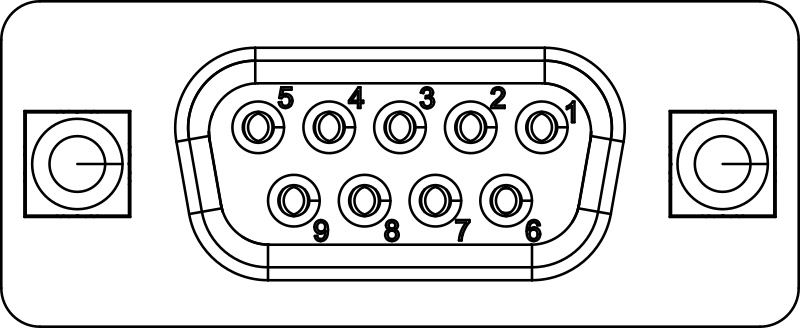
Pin functionality as viewed from MIO04:
| Pin | Symbol | Description |
|---|---|---|
| 1 | RS485_TX+ | RS485 positive transmit line |
| 2 | RS232_TXD | RS232 transmit line |
| 3 | RS232_RXD | RS232 receive line |
| 4 | RS485_RX+ | RS485 positive receive line |
| 5 | GND | Ground (isolated from other interfaces) |
| 6 | RS485_TX- | RS485 negative transmit line |
| 7 | RS232_CTS | RS232 clear to send |
| 8 | RS232_RTS | RS232 request to send |
| 9 | RS485_RX- | RS485 negative receive line |
Typical Connection Examples

Info
Whether you use RS232 or RS485 is defined solely by the hardware wiring. Hardware flow control and half-/full-duplex operation must be configured in software.
Info
For RS485/RS422 half-duplex operation, connect the COM port RX pins with the corresponding TX pins externally.
Info
In RS485/RS422 mode, add termination resistors to the end of the line. The termination must be 120 ohms at each end of the cable.
COM Port Functionality via REST API
The COM ports of the MIO04 can be accessed via a REST API. The REST API provides endpoints for configuration and data exchange.
See section Device Parameters for details on how to configure the COM ports via the REST API. Parameters only need to be configured once; they are stored persistently in non-volatile memory and retained when the device is powered off or restarted. After a parameter change, a reboot is required to activate the new setting.
Data Exchange via WebSocket
Payload data can be sent and received via a WebSocket connection. The WebSocket endpoint for COM1 is /api/v1/com1/ws and for COM2 is /api/v1/com2/ws.
The WebSocket connection uses the same authentication and TLS settings as the REST API.

Send Data
Data written to the WebSocket is sent to the UART transmit buffer without any conversions.
- Use binary frames to avoid implicit character encoding conversions.
- Use a maximum frame size of 2048 bytes. Larger frames cannot be handled by the firmware and will cause the connection to be closed.
The transmit buffer has a size of 2048 bytes. If the buffer is full, additional data will be dropped until there is space in the buffer again. There is no flow control, so sending data faster than the COM port can handle will cause data loss.
Receive Data
Data received from the COM port is forwarded to the WebSocket client via the RX buffer. The communication is in binary format, so there are no implicit character encoding conversions.
Data is lost if the client cannot receive the data fast enough, e.g. because the client is busy with processing previous data or because of network issues.
Half Duplex Mode
Half-duplex mode can be enabled via the halfduplex parameter. In half-duplex mode, the COM port can only transmit or receive data at a time. The firmware automatically activates the sender during transmission.
Note that sent data is looped back to the receive buffer, so the client will receive the data it has sent. This means that the client needs to keep track of the sent data if it needs to correlate it with received data.
Limitations
The COM port support of the MIO04 has the following limitations:
- No flow control on UART (RTS/CTS or XON/XOFF).
- Only one client can be connected to the WebSocket at a time. If a second client tries to connect, the connection will be rejected.
Device Management
The device provides an HTTPS REST interface for device management and configuration. See REST API for details.
The major features are:
- Firmware update
- Firmware version information
- Hardware inventory information
- Configuration of device parameters
- Device restart
- Factory reset
The REST API is protected by HTTP basic authentication. The default password should be changed by the user.
The HTTPS server comes with a self-signed certificate. For production use, it is recommended to replace it with a certificate signed by a trusted CA. This can be done via the REST API.
You can directly use the REST API from your application or use the io4edge-cli command-line tool, which provides a convenient wrapper around the REST API. Releases are available at the io4edge-client-go GitHub repository.
Firmware Repository
You can find the latest firmware images at the MIO04 Public Firmware Repository.
Device Parameters
Device parameters are persistently stored in non-volatile memory. They are retained when the device is powered off or restarted. Parameters can be configured via the REST API.
The device has two classes of parameters: Global device parameters and COM specific parameters.
Global Device Parameters
Global device parameters are common to all Ci4Rail ModuSio devices.
They can be set over the network using the PUT /parameter/{parameter-name} REST API, or through the console, via the param set <parameter-name> <value> command.
| Parameter | Description | Default | Example |
|---|---|---|---|
| device-id | Identifies the device in the network (e.g. via mDNS) | (None) | MIO04-1 |
| static-ip | static IP address, network mask and gateway. If not set, DHCP is used. | (None) | 192.168.11.11:255.255.255.0:192.168.11.1 |
| wifi-ssid | WiFi SSID to connect to (if not set, WiFi is disabled) | (None) | MyWiFiNetwork |
| wifi-pw | WiFi password (if not set, WiFi is disabled) | (None) | MyWiFiPassword |
| wifi-low-rssi | If set, device starts to scan for better APs if the signal strength drops below this value (unit: dBm) | -100 | -75 |
COM Specific Parameters
These are specific to the COM interfaces. They can be set as a ParameterSet or as single parameters.
Using ParameterSets has the advantage that all parameters are set atomically and you can upload a version number for that set. This makes it possible to keep track of configuration changes. The default version is "factory".
When manipulating single parameters, the version number is appended with a "(modified)" suffix.
Use the PUT /{com-port}/parameterset REST API to set a ParameterSet, or the PUT /{com-port}/parameter/{parameter-name} REST API to set single parameters. {com-port} can be either com1 or com2.
Via the console, only single parameters can be set, using the param {com-port}.{parameter-name} <value> command.
| Parameter | Description | Default | Example |
|---|---|---|---|
| baudrate | Baud rate of the COM interface | 9600 | 115200 |
| databits | Number of data bits per character (7 or 8) | 8 | 7 |
| stopbits | Number of stop bits per character (1 or 2) | 1 | 2 |
| parity | Parity of the COM interface (none, even, odd) | none | even |
| halfduplex | Enable half-duplex operation (on, off) | off | on |
Diagnostics
The device exposes metrics and log data for diagnostics and monitoring.
Device Metrics
The device provides metrics via the Prometheus API, delivering Prometheus text-based metrics. They can be directly consumed by a Prometheus server.
The metrics are available at http://<device-ip>:9100/metrics.
List of available metrics:
| Metric Name | Label | Type | Description |
|---|---|---|---|
| reset_count | reason | Counter | Number of device resets, labeled by reset reason (poweron, software, panic, ...) |
| free_heap | Gauge | Free heap memory in bytes | |
| up_seconds | Gauge | Uptime in seconds | |
| bytes_received_from_host_total | interface | Counter | Number of bytes received from host over WebSocket, total count (interface: com1 or com2) |
| bytes_sent_to_host_total | interface | Counter | Number of bytes sent to host over WebSocket, total count (interface: com1 or com2) |
| uart_bytes_received_total | interface | Counter | Number of bytes received from UART, total count (interface: com1 or com2) |
| uart_bytes_sent_total | interface | Counter | Number of bytes sent to UART, total count (interface: com1 or com2) |
| rx_buffer_full_total | interface | Counter | Number of times the UART RX buffer is full (interface: com1 or com2) |
| rx_fifo_overflow_total | interface | Counter | Number of times the UART RX FIFO overflowed, total count (interface: com1 or com2) |
| rx_frame_error_total | interface | Counter | Number of times a UART frame error occurred, total count (interface: com1 or com2) |
| rx_parity_error_total | interface | Counter | Number of times a UART parity error occurred, total count (interface: com1 or com2) |
Log Data
Log data is available via TCP port 9998. The log data is in plain text format and can be viewed using netcat, e.g. nc <device-ip> 9998.
Example log data:
I (2380) prometheus_exporter: HTTP server started on port 9100
I (2380) io4edge_mdns_service: mDNS Service=_prometheus instance=S103-MIO04-01-00002-9999-prometheus_exporter port=9100 successful created
I (2382) reset_counters: Reset reason unknown count: 0
I (2382) reset_counters: Reset reason poweron count: 4
I (2382) reset_counters: Reset reason external count: 0
Each line begins with a log level indicator: I for info, W for warning, E for error. This is followed by a timestamp in milliseconds since boot, the module name, and the log message.
Note
The log data is not persistent, so it is lost when the device is powered off or restarted. It is recommended to use a log collector to store the log data persistently. Furthermore, the device can only buffer a few lines of log data; older log data is lost when the buffer is full.
LLDP
The MIO04 supports sending Link Layer Discovery Protocol (LLDP) frames for network topology discovery and management. Received LLDP frames are ignored.
LLDP is defined by IEEE 802.1AB. It is a vendor-neutral, Layer 2 neighbor discovery protocol that uses Ethernet multicast destination MAC 01:80:C2:00:00:0E and Ethertype 0x88CC. LLDP frames carry a sequence of TLVs (Type-Length-Value) describing the chassis, port, and system capabilities.
The LLDP Frame is sent every 30 seconds with the following content
Chassis ID: Ethernet MAC Address of the DevicePort: Fixed toeth0TTL: 120 seconds (How long the neighbor shall treat the last info as valid)System Name: Hardware Model, e.g.S103-MI004-01-00002- If no io4edge device-id is set:
<Model>-<Serial>, e.g.S103-MI004-01-00002-a6c00f31-dc59-4a36-86e3-c8f7deb754b3 - or device-id if it is set
- If no io4edge device-id is set:
System Description:<Vendor> <Model> <Serial> <Firmware>, e.g.Ci4Rail S103-MIO04-01-00002 0fcb64c3-ff8b-4f6f-8708-f33c1f4d88c6 fw-mio04-01-restapi_0.3.0
System Application Conditions
The following conditions must be fulfilled by the user to ensure correct operation of the device:
- [01] If no static IP is configured, the user must provide a DHCP server so that the device can obtain an IP address on boot.
- [02] The user shall change the default REST API password during provisioning.
- [03] The user shall configure a valid certificate for the REST API during provisioning, matching the device’s address.
Device Security
The device implements several security features to protect against unauthorized access and ensure data integrity.
Secure Boot and Flash Encryption
The device implements Secure Boot and Flash Encryption to protect the integrity and confidentiality of the firmware and configuration data.
This means:
- Only firmware images signed by Ci4Rail can be booted
- Firmware updates via the console are disabled; only firmware updates via REST API are possible
- Anti-rollback: A firmware image with a lower secure version number than the currently installed version cannot be installed
- The firmware and configuration data stored in flash memory are encrypted, so they cannot be read by an attacker with physical access to the device
REST API Security
The REST API is protected by HTTP basic authentication. The default password should be changed by the user (see System Application Conditions, [02]).
Furthermore, the REST API uses HTTPS to encrypt the communication between the client and the server. The device comes with a self-signed certificate. For production use, it is recommended to replace it with a certificate signed by a trusted CA (see System Application Conditions, [03]).
Non-Secure Interfaces
Due to the nature of the protocols, the following interfaces are not secure.
- Metrics interface: There is no authentication or encryption, so an attacker with network access can read the metrics.
- Log interface: There is no authentication or encryption, so an attacker with network access can read the log data.
Open Source Declaration
This product includes open source software.
You must adhere to the license terms of the open source software. Each release in the Firmware Repository contains a licences.tar.gz file with the following contents:
OPEN_SOURCE_NOTICES.txt- statement of open source software used in this releasesbom.spdx- SPDX Software Bill of Materials (SBOM)licences.tar.gz- archive containing the license texts of the open source software used in this release