Bitbus
Bitbus LEDs and Connectors on Front Panel
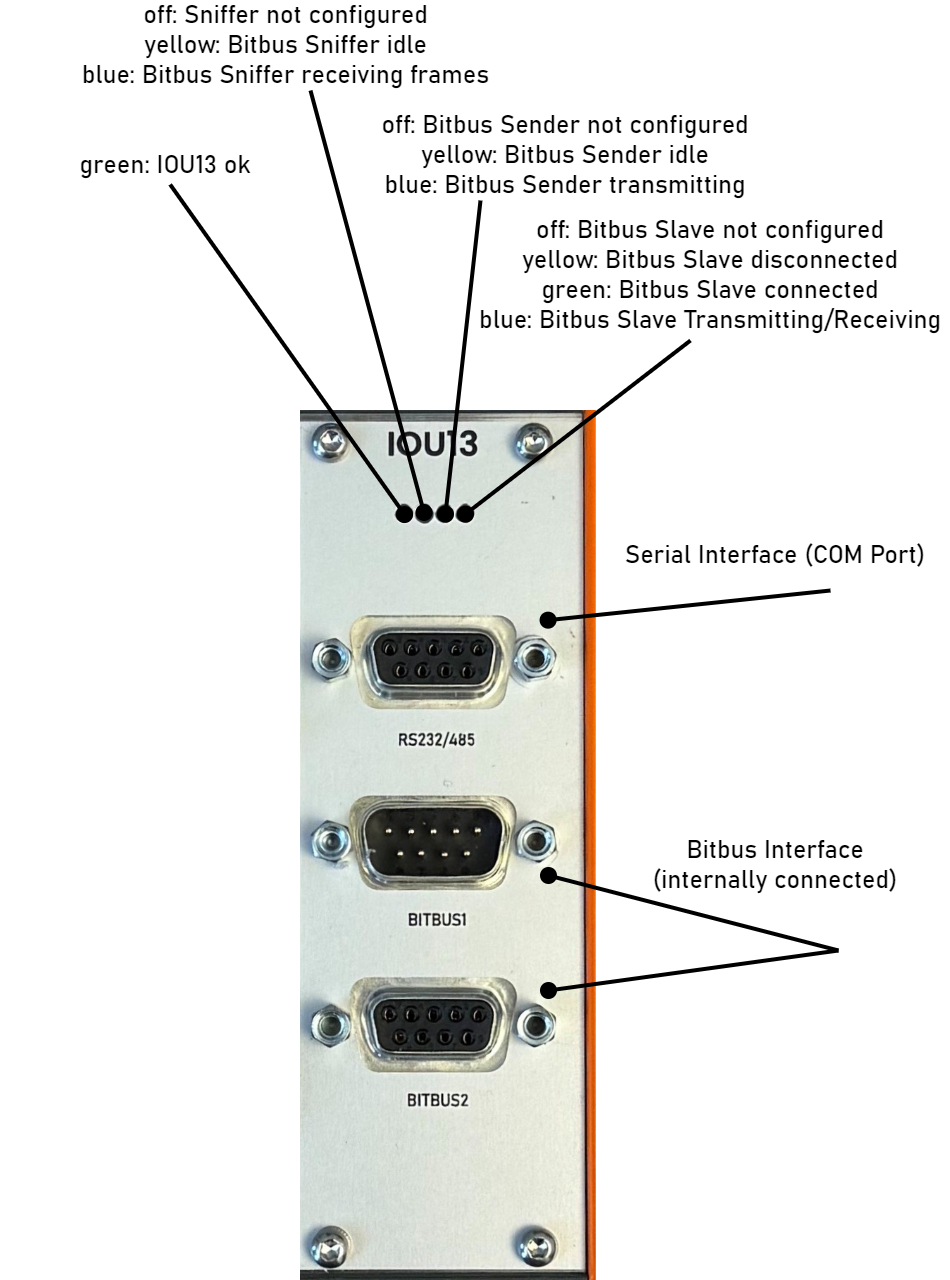
The IOU13 (Bitbus Slave Variant) is supplied via one 9-pin D-Sub (male) and one 9-pin D-Sub (female) connector for Bitbus Interface. They are internally connected 1:1.
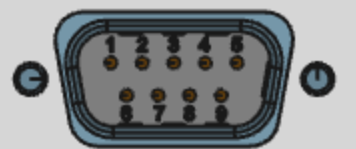
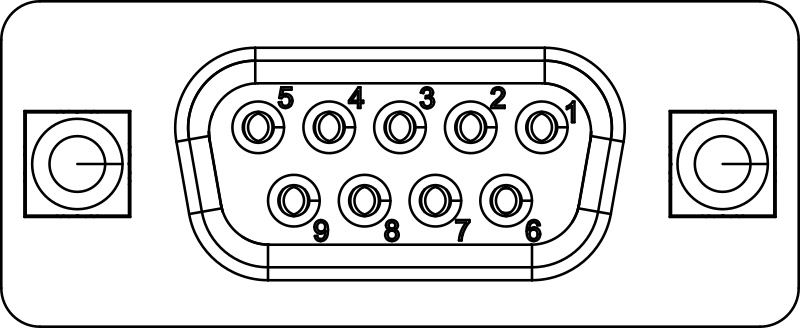
Pin functionality as viewed from IOU13 (Bitbus Slave Variant):
| Pin | Signal Designator | Signal Description |
|---|---|---|
| 1 | NC | not connected |
| 2 | NC | not connected |
| 3 | DATA- | negative bitbus data signal |
| 4 | RESERVED | do not connect |
| 5 | GND | Ground (isolated from other interfaces) |
| 6 | NC | not connected |
| 7 | NC | not connected |
| 8 | DATA+ | positive bitbus data signal |
| 9 | RESERVED | do not connect |
Bitbus Function Blocks
The transmit-capable IOU13 (Bitbus Slave Variant) running bbslave firmware provides two Bitbus function blocks:
| Function block | Purpose | Service type |
|---|---|---|
bitbusSniffer |
Capture SDLC frames and send raw frames | _io4edge_bitbusSniffer._tcp |
bitbusSlave |
Act as one Bitbus slave and exchange application information fields with a master | _io4edge_bitbusSlave._tcp |
Both use the module's Bitbus interface and support 62500 and 375000 baud. Configure matching baud rates when using them together. The sniffer's internal loopback setting also applies to transmissions from the slave.
These capabilities require the transmit-capable hardware and bbslave firmware. The listen-only hardware running default firmware cannot transmit on the external bus. The COM port is described separately in the serial function block documentation.
Client Libraries and Addressing
The examples below use the io4edge Go and Python clients. Follow the quick-start guide to run the complete Go loopback example. Installation instructions and example links for each function block are included below.
Use these packages:
The Go snippets belong inside an application function returning error. Check returned errors and use defer to stop streams and close clients when the function exits. A discovery timeout of 0 selects the default.
import (
    "bytes"
    "fmt"
    "time"

    "github.com/ci4rail/io4edge-client-go/v2/pkg/protobufcom/common/functionblock"
    "github.com/ci4rail/io4edge-client-go/v2/pkg/protobufcom/functionblockclients/bitbussniffer"
    "github.com/ci4rail/io4edge-client-go/v2/pkg/protobufcom/functionblockclients/bitbusslave"
)
Python calls raise exceptions on errors; handle TimeoutError for read timeouts and RuntimeError for rejected commands. Close clients in a finally block or use them as context managers (with ... as ...) so resources are released even on errors.
import io4edge_client.bitbussniffer as bbsniffer
import io4edge_client.bitbusslave as bbslave
import io4edge_client.functionblock as fb
Replace the example endpoints with the values reported by io4edge-cli scan -f. Both clients also accept an mDNS service instance name.
Bitbus Sniffer: SDLC Receiver and Sender
The Bitbus sniffer function block was originally designed to monitor and analyze SDLC traffic on the Bitbus network. However, with the IOU13 (Bitbus Slave Variant) hardware and firmware, it can also send raw SDLC frames.
Features:
- Timestamping of received data with microsecond resolution
- Capturing of all SDLC frames on the Bitbus
- Filtering of Bitbus frames by address and minimal length
- 62.5 and 375 kBaud supported
- Optional sending capability of raw SDLC frames
First, install the io4edge client library.
Want to have a quick look to the examples? See our Github repository.
First, install the io4edge client library.
Want to have a quick look to the examples? See our Github repository.
Connect and Configure
sniffer, err := bitbussniffer.NewClientFromUniversalAddress("S101-IOU13-USB-EXT-1-bitbus", 0)
if err != nil {
    return err
}
defer sniffer.Close()

err = sniffer.UploadConfiguration(
    bitbussniffer.WithIgnoreCRC(false),
    bitbussniffer.WithBaud62500(false),
    bitbussniffer.WithAddressFilter(bytes.Repeat([]byte{0xff}, 32)),
    bitbussniffer.WithMinFrameLength(0),
    bitbussniffer.WithPrepareSender(true),
    bitbussniffer.WithLoopbackEnable(true),
    bitbussniffer.WithFullDuplex(true),
)
if err != nil {
    return err
}
| Option | Meaning |
|---|---|
WithIgnoreCRC |
true captures frames with invalid CRCs and marks them with bad_crc; false discards them. |
WithBaud62500 |
true selects 62500 baud; false selects 375000 baud. |
WithAddressFilter |
A 32-byte mask with one bit per address. An address passes when its bit is set. All bytes 0xff accept all addresses; a first byte of 0x07 accepts addresses 0, 1, and 2. |
WithMinFrameLength |
Discard captured frames shorter than this length. |
WithPrepareSender |
Enable raw-frame transmission through the sniffer function block. |
WithLoopbackEnable |
Loop local transmissions, including slave transmissions, back internally and disable external bus activity. |
WithFullDuplex |
Keep the receiver enabled while transmitting, allowing local echoes to be captured. |
sniffer = bbsniffer.Client("S101-IOU13-USB-EXT-1-bitbus")
sniffer.upload_configuration(
    bbsniffer.Pb.ConfigurationSet(
        ignore_crc=False,
        baud_62500=False,
        address_filter=bytes([0xff] * 32),
        min_frame_length=0,
        prepare_sender=True,
        loopback_enable=True,
        full_duplex=True,
    )
)
| Field | Meaning |
|---|---|
ignore_crc |
True captures frames with invalid CRCs and marks them with bad_crc; False discards them. |
baud_62500 |
True selects 62500 baud; False selects 375000 baud. |
address_filter |
A 32-byte mask with one bit per address. An address passes when its bit is set. All bytes 0xff accept all addresses; a first byte of 0x07 accepts addresses 0, 1, and 2. |
min_frame_length |
Discard captured frames shorter than this length. |
prepare_sender |
Enable raw-frame transmission through the sniffer function block. |
loopback_enable |
Loop local transmissions, including slave transmissions, back internally and disable external bus activity. |
full_duplex |
Keep the receiver enabled while transmitting, allowing local echoes to be captured. |
This configuration enables internal loopback, as used by the quick-start demo. For external bus operation, set WithLoopbackEnable(false) in Go or loopback_enable=False in Python and select the appropriate duplex setting.
Info
If loopback_enable is set to True, the sniffer AND the slave function block
will internally loop back local transmissions. External transmission is cut-off.
You may use it therefore as a self-test for the sniffer and slave functionality.
Each upload supplies a complete sniffer configuration. Unspecified options take their protobuf zero values; they do not preserve the previous settings. Always supply the intended address filter.
Receive Frames
Start a stream, then read buckets of received samples:
Low-latency mode can be enabled to reduce the delay receiving a frame and the application layer processing. If low-latency mode is off, the application will only be invoked when the buffer is full or keep alive timeout is reached.
if err := sniffer.StartStream(
    functionblock.WithBucketSamples(20),
    functionblock.WithBufferedSamples(64),
    functionblock.WithKeepaliveInterval(1000),
    functionblock.WithLowLatencyMode(true),
); err != nil {
    return err
}
defer sniffer.StopStream()

sd, err := sniffer.ReadStream(3 * time.Second)
if err != nil {
    return err
}
for _, sample := range sd.FSData.Samples {
    fmt.Printf("%d us: frame=%x flags=0x%x\n",
        sample.Timestamp, sample.BitbusFrame, sample.Flags)
}
ReadStream returns stream metadata and function-specific data in FSData. Call StopStream and Close when finished; the deferred calls shown here handle cleanup when the enclosing function returns.
sniffer.start_stream(
    fb_config=fb.Pb.StreamControlStart(
        bucketSamples=20,
        bufferedSamples=64,
        keepaliveInterval=1000,
        low_latency_mode=True,
    )
)

generic_data, stream_data = sniffer.read_stream(timeout=3)
for sample in stream_data.samples:
    print(
        f"{sample.timestamp} us: frame={sample.bitbus_frame.hex()} "
        f"flags=0x{sample.flags:x}"
    )
read_stream returns a pair of generic stream metadata and function-specific data. Call stop_stream and close when finished; closing a client also stops its active stream.
Repeat the stream read to receive further buckets. A keepalive bucket can contain no samples. Handle read timeouts in your application.
Each sample contains:
Timestamp(Go) /timestamp(Python): microseconds since device startup, not synchronized to the host clock.BitbusFrame(Go) /bitbus_frame(Python): address byte, control byte, and the information field. The CRC is not included. Check the length before accessing individual fields.Flags(Go) /flags(Python): a bitmask indicating capture errors or lost data.
| Flag | Value | Meaning |
|---|---|---|
bad_crc |
0x01 |
The captured frame has an invalid CRC. |
frames_lost |
0x10 |
Frames were lost between the FPGA and microcontroller before this sample. |
buf_overrun |
0x20 |
A buffer overrun occurred between the microcontroller and host before this sample. |
Stream options control batching and buffering:
| Option | Meaning |
|---|---|
WithBucketSamples |
Sample count per bucket. |
WithBufferedSamples |
Requested sample buffering. |
WithKeepaliveInterval |
Keepalive interval in milliseconds. |
WithLowLatencyMode |
Enable to reduce waiting for a bucket to fill. |
Pass these fields to fb.Pb.StreamControlStart:
| Field | Meaning |
|---|---|
bucketSamples |
Sample count per bucket. |
bufferedSamples |
Requested sample buffering. |
keepaliveInterval |
Keepalive interval in milliseconds. |
low_latency_mode |
Enable to reduce waiting for a bucket to fill. |
Send Raw Frames
With WithPrepareSender(true) (Go) or prepare_sender=True (Python) configured, the sniffer function block allows
sending of frames, e.g. to simulate a Bitbus master.
Send the address and control bytes followed by any information bytes:
// SNRM command to slave address 1
if err := sniffer.SendFrame([]byte{0x01, 0x93}); err != nil {
    return err
}
# SNRM command to slave address 1
sniffer.send_frame(bytes([0x01, 0x93]))
Do not append a CRC to the frame passed to SendFrame or send_frame. This interface sends raw SDLC frames.
In case a master shall be simulated, the application must implement any master-side handshake, polling, sequence-number handling, and acknowledgements it needs. The complete loopback example demonstrates those operations.
When full duplex is enabled, the receive stream will contain the transmitted command as a local echo as well as traffic from other nodes.
The Go sniffer examples provide dumpstream and send programs. The send program preserves the existing device configuration, so configure the sender before using it.
The Python sniffer examples provide dumpstream.py and send.py programs for capturing and sending frames.
Bitbus Slave Function Block
The slave function block handles the slave-side link protocol and operates as a single slave node, with exactly one node address. The host application receives the content of I-Frames from the master and prepares I-Frames that are sent on the bus when the master polls the slave.
It does not supply raw address or control bytes through this function block.
The slave is always in one of two states:
- NDM - Normal Disconnected Mode
- NRM - Normal Response Mode
A slave device enters NDM after a local reset or when it detects an irrecoverable protocol error. In this mode, a slave is awaiting a specific command from the master device to enter NRM. A slave device may not exchange messages with the master device in this mode. A slave device enters NRM only after receiving a specific command from the master device. Upon entering NRM, a slave device is "synchronized" with the master device, meaning that all sequence counts match (they are all initialized to 0). In this mode, a slave device may exchange messages with the master device as long as "synchronization" is maintained (i.e. no sequence count errors).
Data exchange with the master is therefore possible only in NRM.
Client Installation
First, install the io4edge client library.
Want to have a quick look to the examples? See our Github repository.
First, install the io4edge client library.
Want to have a quick look to the examples? See our Github repository.
Connect and Configure
slave, err := bitbusslave.NewClientFromUniversalAddress("192.168.210.1:10002", 0)
if err != nil {
    return err
}
defer slave.Close()

if err := slave.UploadConfiguration(
    bitbusslave.WithSlaveAddress(1),
    bitbusslave.WithBaud62500(false),
    bitbusslave.WithMaxFrameLength(0),
    bitbusslave.WithAppWDTimeoutMS(5000),
    bitbusslave.WithIdleResponse([]byte{0x00}),
); err != nil {
    return err
}
| Option | Meaning |
|---|---|
WithSlaveAddress |
Slave address, from 1 to 249. |
WithBaud62500 |
true selects 62500 baud; false selects 375000 baud. |
WithMaxFrameLength |
Limit for the outgoing information field; 0 permits up to 255 bytes. |
WithAppWDTimeoutMS |
Application watchdog timeout from 500 to 60000 ms, checked with approximately 50 ms resolution. Expiry puts the slave into disconnected (ndm) mode. |
WithIdleResponse |
Information field to return when no application message is pending. An empty value makes the slave return RR (Receive Ready) instead. |
slave = bbslave.Client("192.168.210.1:10002")
slave.upload_configuration(
    bbslave.Pb.ConfigurationSet(
        slave_address=1,
        baud_62500=False,
        max_frame_length=0,
        app_wd_timeout_ms=5000,
        idle_response=bytes([0x00]),
    )
)
| Field | Meaning |
|---|---|
slave_address |
Slave address, from 1 to 249. |
baud_62500 |
True selects 62500 baud; False selects 375000 baud. |
max_frame_length |
Limit for the outgoing information field; 0 permits up to 255 bytes. |
app_wd_timeout_ms |
Application watchdog timeout from 500 to 60000 ms, checked with approximately 50 ms resolution. Expiry puts the slave into disconnected (ndm) mode. |
idle_response |
Information field to return when no application message is pending. An empty value makes the slave return RR (Receive Ready) instead. |
Always set the watchdog timeout explicitly. Then, once in NRM, supply the prepared transmit message periodically to the master, before the watchdog expires.
Read Slave State
state, err := slave.State()
if err != nil {
    return err
}
fmt.Printf("mode=%s pending TX=%t\n", state.Mode, state.HavePendingTxMsg)
state = slave.get_state()
print(
    f"mode={bbslave.Pb.SlaveMode.Name(state.mode)} "
    f"pending TX={state.have_pending_tx_msg}"
)
| Mode | Meaning |
|---|---|
not_configured |
The slave is not configured and does not respond to master requests. |
ndm |
Normal disconnected mode; establish the link before exchanging application messages. |
nrm |
Normal response mode; the slave can exchange application messages with the master. |
HavePendingTxMsg (Go) or have_pending_tx_msg (Python) indicates that an
application transmit message is still pending (not read/accepted by the master).
Prepare a Response to the Master
Once the slave is in nrm mode and no transmit message is pending:
if err := slave.SetPreparedTxMsg([]byte("slave message")); err != nil {
    return err
}
slave.set_tx_message(b"slave message")
This prepares an information field to send when the master addresses the slave. It does not initiate an unsolicited transmission. The firmware rejects an empty message, a message exceeding the configured length, a new message while another is pending, or a message submitted while disconnected. Handle errors even after reading the state, since the state can change between calls.
When there is no pending application message, the slave uses the configured idle response or RR, when the master addresses the slave.
Receive Messages from the Master
All received messages from the master will be put into the function block's stream.
Low-latency mode can be enabled to reduce the delay between the slave receiving an information frame and the application layer processing on the slave side. If low-latency mode is off, the application will only be invoked when the buffer is full or keep alive timeout is reached.
if err := slave.StartStream(
    functionblock.WithBucketSamples(32),
    functionblock.WithBufferedSamples(64),
    functionblock.WithKeepaliveInterval(1000),
    functionblock.WithLowLatencyMode(true),
); err != nil {
    return err
}
defer slave.StopStream()

slaveData, err := slave.ReadStream(3 * time.Second)
if err != nil {
    return err
}
for _, sample := range slaveData.FSData.Samples {
    fmt.Printf("%d us: information=%x\n",
        sample.Timestamp, sample.BitbusInformation)
}
slave.start_stream(
    fb_config=fb.Pb.StreamControlStart(
        bucketSamples=1,
        bufferedSamples=64,
        keepaliveInterval=1000,
        low_latency_mode=True,
    )
)

generic_data, stream_data = slave.read_stream(timeout=3)
for sample in stream_data.samples:
    print(f"{sample.timestamp} us: information={sample.bitbus_information.hex()}")
Each slave sample contains a device timestamp in microseconds and
the BitbusInformation (Go) or bitbus_information (Python) field received for this slave.
Address, control, and CRC bytes are not part of that field.